



Comment utiliser l'affichage de Samebike
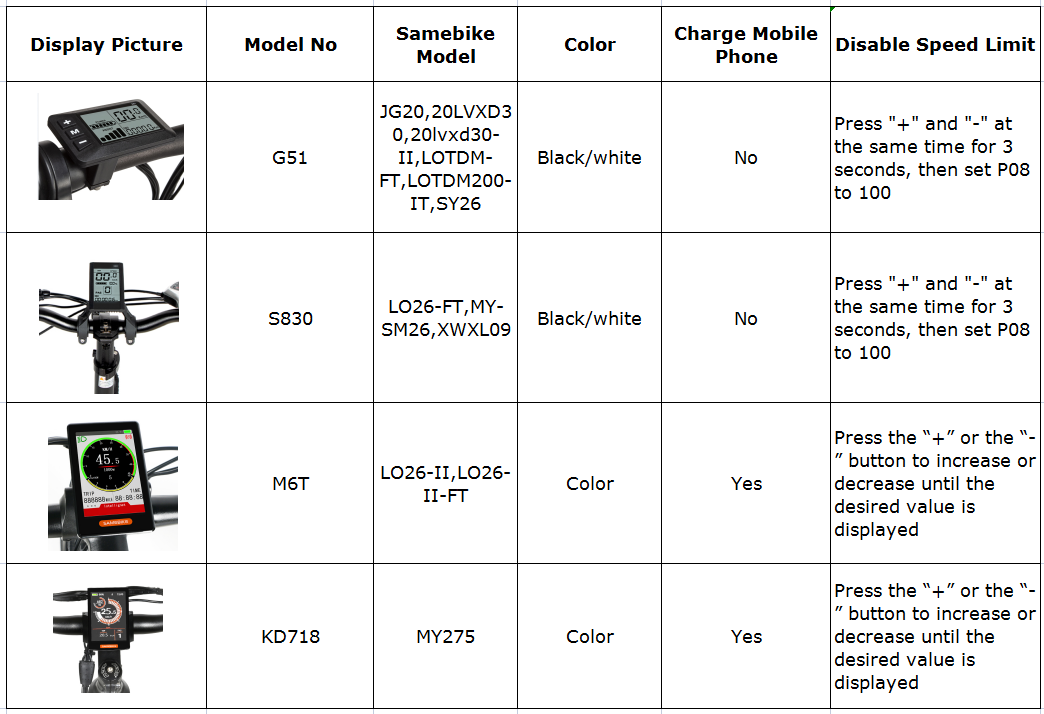
Il existe 4 types d'écrans pour SAMEBIKE, comme ci-dessous :
Si vous souhaitez savoir comment utiliser l'affichage étape par étape, veuillez télécharger le manuel d'utilisation via notre boutique en ligne.
 Aller au contenu
 Free Shipping On All E-bikes
Il existe 4 types d'écrans pour SAMEBIKE, comme ci-dessous :
Si vous souhaitez savoir comment utiliser l'affichage étape par étape, veuillez télécharger le manuel d'utilisation via notre boutique en ligne.
How to get ot off PAmenu rs-a01?
How do I turn it on? It is new. It has been charging for an hour. The on button does nothing. I’ve tried the key both ways.
I need to simplify my understanding of the bike computer on the same bike CY 20 as it seems to be slow when going up a hill to around 8 miles an hour and that’s including peddling. Please send me a simplified manual of the different programs on the bike computer, so I know that the settings right for the CY 2020 inch wheels thank you
David Simpson.
Hi, your dispaly M6T works wel, however the graphic design is not optimal. Is it possible significantly increase the “Gear” number ? Its to small to read it quick and for me it is maybe most important information on display. Same with current battery status – small green icon in top corner … on the other hand, there is not used space – big red zone at bottom of display for example… Is there possible to update display firmware in case it will be updated ?
Jak nastavit displej aby mi zprávě zaznamenal kapacitu stavu baterie samebike xd 26 48v 14 ah
laissez un commentaire